Articles
How AI Coding Agents Actually Run on Your Machine
A technical look at how Claude Code, Codex CLI, and other coding assistants store sessions, run tools, ask for approval, and leave teams with fragmented controls.
Calling Claude Code or Codex CLI a "chat interface with repo access" misses the important part. These tools are local runtimes. They run on a developer workstation, gather repository context, call a remote model, receive tool requests, execute those requests against the local filesystem and shell, write session logs, and keep enough state to resume later.
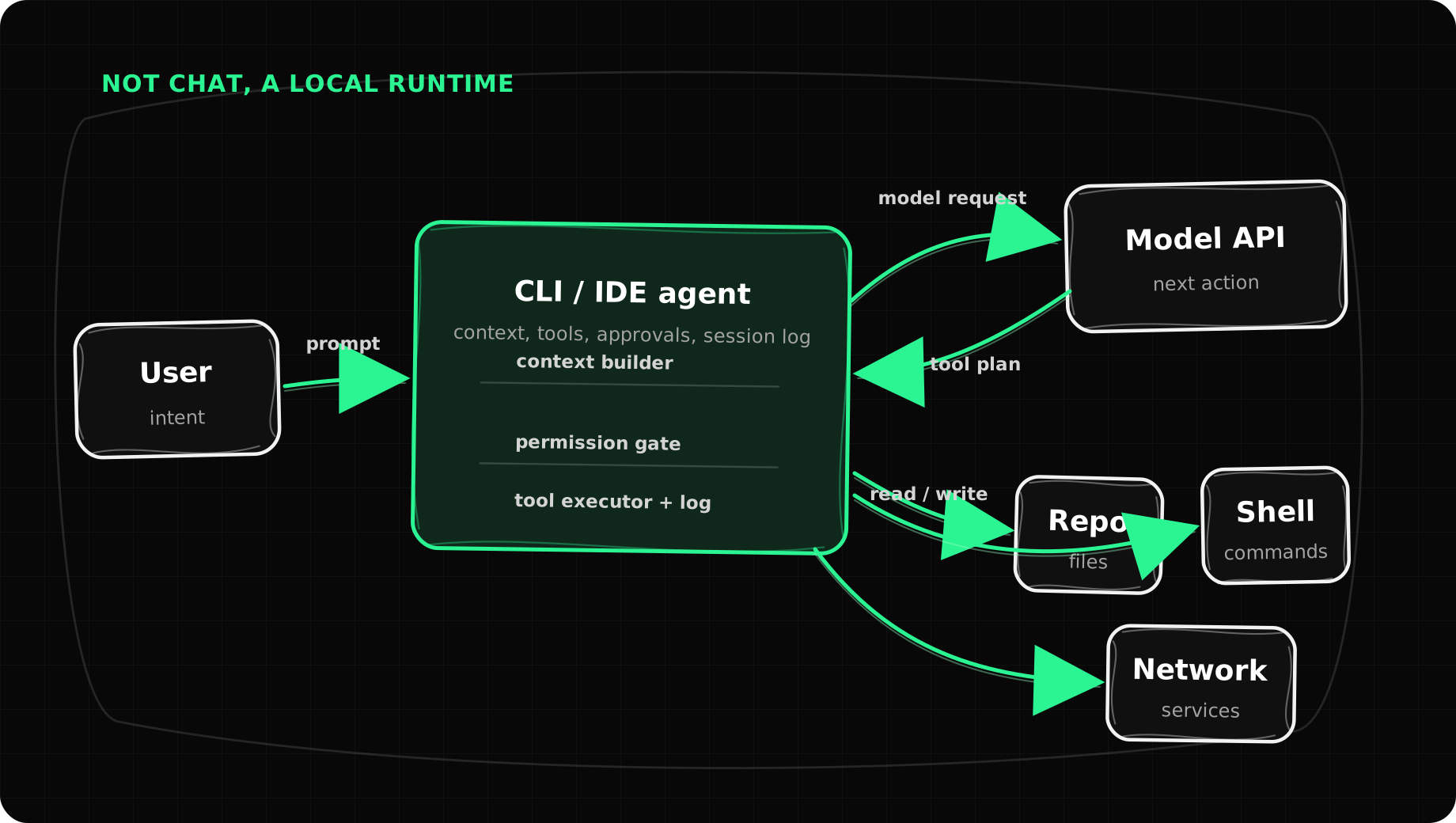
The files on disk make the shape obvious. A coding assistant has five pieces:
- A model connection that sends prompts, tool definitions, repository context, and previous conversation turns to a remote API.
- A tool layer that turns model requests like "read this file" or "run this command" into real local actions.
- A session store that records every message, tool call, tool result, token count, and metadata to disk.
- A permission system that decides whether a requested action is allowed, denied, or requires interactive user approval.
- A host environment - files, shell state, network, credentials, Git remotes, package managers, MCP servers - that determines what the assistant can actually reach.
That is why security teams should care. The assistant is not only suggesting code. It is operating a developer workstation.
The Runtime Loop
Every coding assistant runs a variant of the same loop:
user intent
  -> local context assembly (files, git state, project instructions)
  -> model API request (prompt + tool definitions + prior turns)
  -> model response: text or structured tool_use call
  -> local tool execution (read, write, bash, grep, web fetch, ...)
  -> tool result appended to conversation transcript
  -> next model API request
  -> ... (repeat until the model emits a final text response)
The model does not directly touch your files or run commands. It emits structured tool calls. The local process, usually a CLI binary or IDE extension, executes those calls, captures the result, and feeds it back into the conversation. For security work, the question is not only "what did the model say?" It is "what did the local process do after the model asked?"
Claude Code records tool use in Anthropic-style content blocks:
{
  "type": "tool_use",
  "id": "toolu_01ABC...",
  "name": "Bash",
  "input": { "command": "cargo test --release", "timeout": 120000 }
}
The result comes back as a tool_result block keyed by the same id. The tool vocabulary includes Read, Edit, Write, Bash, Grep, Glob, Agent (for subagents), WebFetch, WebSearch, TaskCreate, and more. Each tool call is a discrete local action with observable inputs and outputs.
Codex CLI records the same pattern in OpenAI function-call form:
{
  "type": "function_call",
  "name": "exec_command",
  "arguments": "{\"cmd\":[\"rg\",\"-n\",\"PolicyStore\",\"src\"],\"workdir\":\"/repo\"}",
  "call_id": "call_xYz..."
}
The result is a later function_call_output item with the same call_id. Different products serialize the loop differently, but the operating model is identical: model output becomes a typed request to a local runtime, and the runtime decides whether and how to execute it.
Where Claude Code Stores State
Claude Code stores most of its operational state in flat files under ~/.claude/. The directory structure reveals how sessions, permissions, and project context are actually managed:
~/.claude/
  settings.json              # Global permission rules, model, plugins
  .credentials.json          # OAuth tokens, service tier
  history.jsonl              # Index: prompt -> project path + session ID
  projects/
    <escaped-cwd>/           # One dir per working directory (path-encoded)
      <session-uuid>.jsonl   # Full conversation transcript
      memory/                # Persistent memory files (per-project)
      CLAUDE.md              # Project instructions (loaded into context)
  sessions/
    <pid>.json               # Active session metadata (pid, cwd, start time)
  file-history/
    <session-uuid>/
      <content-hash>@v1      # Content-addressed file snapshots before edits
  tasks/                     # Task tracking state (per-session)
  todos/                     # Agent-specific task metadata
  session-env/               # Shell environment snapshots
  shell-snapshots/           # Shell state captured at session start
  plugins/                   # Plugin system (hooks, LSP, MCP servers)
    marketplaces/
    installed_plugins.json
The lightweight index is history.jsonl - each line maps a user prompt to a project path and session ID. The full transcript lives in projects/<escaped-cwd>/<session-uuid>.jsonl, where each line is a chronological JSON object with fields like type, uuid, parentUuid, timestamp, isSidechain, and message.
The parentUuid and isSidechain fields matter because a session is not always a straight chat. Claude Code can spawn subagents through the Agent tool or run sidechain work. The transcript preserves lineage, but you have to parse the tree. Reading the file line by line misses the shape.
Claude Code also keeps file backups in file-history/<session-uuid>/. These are content-addressed snapshots taken before edits. Paired with file-history-snapshot records in the transcript, they can reconstruct before-and-after file state. Helpful for debugging, yes. Also worth noting: the assistant's local data directory may contain source code, prompts, environment captures, and old file contents.
Claude Code Permissions
Project-level permissions live in .claude/settings.local.json:
{
  "permissions": {
    "allow": [
      "Bash(cargo:*)",
      "Read(/repo/**)",
      "Bash(sqlite3:*)",
      "WebFetch(domain:github.com)"
    ],
    "deny": [],
    "ask": []
  }
}
Global user-level permissions in ~/.claude/settings.json follow the same structure but apply across all projects. Permission rules use pattern matching - Bash(cargo:*) allows any cargo command, Read(/repo/**) allows reading any file under /repo. Wildcards, domain restrictions, and prefix patterns are supported.
Claude Code also supports a hooks system via plugins. Hooks fire on events like PreToolUse, PostToolUse, UserPromptSubmit, and Stop. A PreToolUse hook receives the tool name and input as JSON on stdin and can return a permission decision (allow, deny, or ask). This is useful, but it is local to the machine, configured per-user or per-project, and hard to audit centrally.
In practice, broad approvals become policy. The assistant's authority widens one approval at a time.
Where Codex Stores State
Codex CLI uses ~/.codex/. The directory combines JSONL transcripts with SQLite databases for richer structured queries:
~/.codex/
  config.toml               # Model preferences, per-project trust levels
  auth.json                  # OAuth tokens (file mode 0600)
  rules/
    default.rules            # Persisted approval decisions as prefix rules
  history.jsonl              # Global interaction history
  sessions/
    <year>/<month>/<day>/
      rollout-<iso-ts>-<uuid>.jsonl   # Full session transcript
  state_5.sqlite             # Threads, tools, jobs, spawn edges, sandbox policy
  logs_2.sqlite              # Logging database
  goals_1.sqlite             # Goal/task tracking
  memories/                  # User-created notes
  skills/                    # Skill definitions (system and custom)
  plugins/                   # Plugin cache and remote installations
  cache/                     # Application and tool caching
Codex Trust and Approvals
The config.toml records model preferences and per-project trust:
personality = "pragmatic"
model = "gpt-5.5"
model_reasoning_effort = "xhigh"

[projects."/home/user/code/my-app"]
trust_level = "trusted"

[projects."/home/user/code/infra"]
trust_level = "trusted"
Trust is not abstract - it is bound to absolute filesystem paths. Each trusted project directory gets a different posture from the CLI.
Codex's rules/default.rules persists approval decisions as prefix-matching rules:
prefix_rule(pattern=["rg"], decision="allow")
prefix_rule(pattern=["sed"], decision="allow")
prefix_rule(pattern=["cargo", "check"], decision="allow")
prefix_rule(pattern=["bun", "run", "build"], decision="allow")
The format is deliberately simple. A tool call matches an approved prefix, gets rejected, or goes to the user for approval. That works for one developer. For a team, the rule itself is only the start. You still need to know who approved it, when it was used, what it affected, and whether it should exist on other machines.
Codex Session Structure
The SQLite database state_5.sqlite adds structure that plain JSONL files cannot provide. Its threads table records session IDs, rollout paths, working directories, model provider, model name, token usage, Git branch, Git SHA, sandbox policy, approval mode, and a generated title. Other tables include dynamic_tools, thread_spawn_edges, agent_jobs, and agent_job_items.
This is where "chat" becomes the wrong abstraction. Codex models sessions as threads with tools, jobs, child threads, and resumable state. A sandbox_policy field per thread means sandboxing is tied to a session. It can change between runs, and it changes what the assistant can really do on the machine.
Sessions, Subagents, and Lineage
Subagents are not magic. They are nested tool calls, sidechain transcript records, or child sessions.
Claude Code exposes an Agent tool that spawns a subagent with its own tool access. Lineage is tracked through parentUuid and isSidechain fields in transcript records, plus task and todo artifacts keyed by session and agent IDs. The subagent may look separate in the UI, but in the data it is a branch in a transcript DAG.
Codex records parent-child relationships more explicitly. The thread_spawn_edges table links parent threads to children. The agent_jobs and agent_job_items tables represent batched parallel work, with assigned thread IDs, attempt counts, result JSON, and completion status. A parallel coding task is not just a long prompt. It is a small job system with its own lifecycle.
This distinction matters for audit. A useful audit log cannot stop at the top-level user prompt. It needs to answer:
Each assistant's local store contains pieces of those answers. None of them contain all the pieces in the same schema, and none of them expose that data as a unified governance surface.
How Policy Actually Gets Enforced
There are five layers of policy around a coding assistant, and they are easy to conflate:
Layer 1: Prompt policy. System instructions, CLAUDE.md project files, AGENTS.md files, and user instructions steer the model's behavior. This shapes what the model is inclined to do, but it does not enforce anything locally. A model can be told "never delete files" - but the enforcement of that rule depends on what the local runtime actually checks.
Layer 2: Tool schema. The model can only request tools that the runtime exposes. Claude Code defines Read, Edit, Write, Bash, Grep, Glob, Agent, WebFetch, and others. Codex exposes exec_command, read_file, write_file, and similar. This limits the action vocabulary - but within a tool like Bash, the command space is effectively unbounded.
Layer 3: Runtime permissioning. This is where allow, deny, and ask decisions happen. Claude Code evaluates permission rules, fires PreToolUse hooks, and prompts the user when a tool call is not covered. Codex matches commands against prefix rules and approval modes. This layer mediates individual tool calls - but it operates per-user, per-machine, and each product's format is different.
Layer 4: Sandboxing. Codex stores a sandbox_policy per thread that can restrict filesystem writes, network access, or shell execution scope. Claude Code supports a --dangerously-skip-permissions flag (the name is instructive). These controls change the assistant's blast radius for a session - but they are session-scoped, locally configured, and not independently verified.
Layer 5: Host environment. Shell profiles, proxy variables, CA trust stores, Git remotes, local credentials, .env files, Docker socket access, browser sessions, and MCP server configurations all shape what the assistant can reach. A model asks for Bash(curl https://internal-api.corp/deploy) - the host environment determines whether that request succeeds.
Here is the team problem. These controls were designed for a single developer trying to get work done. Permission rules accumulate locally. Approvals are persisted per-machine. Sandbox settings live on sessions. Hook configurations differ between projects. There is no shared control plane, no central policy distribution, no cross-tool format, and no independent check that the allowed action matched what actually happened.
Supervision From the Outside
The Rye core codebase approaches this differently. Instead of relying on each assistant's internal controls, it treats assistants as processes that need external supervision. There are three key mechanisms.
Process wrapping with PTY supervision
rye wrap runs an assistant inside a pseudo-terminal. It calls openpty(), fork(), and execvp() to launch the child process (Claude Code, Codex, or any command) with proxy environment variables injected automatically:
HTTP_PROXY=http://127.0.0.1:18080
HTTPS_PROXY=http://127.0.0.1:18080
NODE_EXTRA_CA_CERTS=/path/to/rye.pem
The parent process relays all keystrokes and output between the user's terminal and the child, so the assistant's TUI works exactly as it normally does. While the session runs, the wrapper:
- Watches the working directory recursively with
inotifyfor file creates, modifies, deletes, and renames - Batches file-change telemetry and sends it to the Rye daemon every 5 seconds
- Emits
session.startandsession.endevents with the command, PID, working directory, exit code, and duration - Forwards
SIGINT,SIGTERM, andSIGWINCH(terminal resize) to the child
The wrapper also recognizes a control command. Typing /rye at the start of an input line runs a Rye CLI command from inside the wrapped session, such as rye status or rye doctor, without opening another terminal.
Approval scanning
The wrapper scans the child's terminal output for permission approval events. It strips ANSI escape sequences and looks for patterns like:
You approved codex to run sed -n '1,240p' src/wrap.rs this time
You approved codex to always run commands that start with sed
Each detected approval is recorded as a structured approval.granted event with the agent name, command, approval type (this_time, always, or always_rule_match), the prefix pattern for "always" rules, and a generated approval ID. Later one-time approvals that match an existing "always" rule link back to that ID. The audit trail can then show when a broad rule was created and which later actions used it.
That distinction matters. The assistant records that it was told to execute a command. The wrapper records that the user approved it. Those are not the same event.
Network-level policy enforcement
The Rye daemon runs a local MITM proxy and an optional API shim. The proxy intercepts HTTPS traffic to configured LLM domains - OpenAI, Anthropic, Claude, Cursor, Windsurf, Gemini - using an auto-generated CA certificate. The API shim can sit directly in front of an upstream model API.
Before a request reaches the upstream API, the shim evaluates it against a policy bundle. The policy engine checks rules in order, and the first match wins:
1. DENY  if body contains "BEGIN OPENSSH PRIVATE KEY"
2. DENY  if body exceeds 2 MB
3. ALLOW if domain is openai.com, anthropic.com, claude.com, cursor.com, ...
4. REQUIRE APPROVAL if model field is missing (unknown destination)
When a rule matches Deny or RequireApproval, the shim returns a 403 Forbidden with a structured JSON body. The request never reaches the upstream API. The response includes the rule ID, version, and reason, so the block is traceable.
The policy store is not just a local config file. A gRPC policy sync client subscribes to a remote policy service using a bidirectional stream. The server can push policy snapshots, send invalidation signals, or delete policies. The client acknowledges each revision, reports its status, and falls back to periodic snapshot fetches if the stream disconnects. Policies are validated, persisted locally in SQLite, and applied atomically. That turns policy from a local preference file into a centrally managed, versioned artifact with audit trail.
Shims: always-on wrapping
For teams that want every claude or codex invocation to be supervised, Rye writes shell shims to ~/.rye/shims/:
#!/bin/sh
# Managed by Rye. Remove with `rye app unwrap claude`.
exec '/usr/local/bin/rye' app run-shim 'claude' "$@"
When ~/.rye/shims is earlier in PATH than the real binary, every claude invocation is automatically wrapped. No workflow change, no extra commands. A rye app doctor command verifies PATH ordering, shim existence, and that the underlying binary is still installed.
Ingestion: Understanding What Already Happened
Separate from real-time enforcement, a background ingester scans local assistant history files:
~/.claude/projects/**/*.jsonl     (Claude Code transcripts)
~/.codex/sessions/**/*.jsonl      (Codex CLI rollout files)
~/.cursor/**/*.jsonl              (Cursor session data)
~/.config/Cursor/User/workspaceStorage/**  (Cursor workspace state)
The ingester reads new bytes from each file using checkpointed byte offsets stored in SQLite, splits large content on JSONL line boundaries, hashes each chunk with SHA-256, skips already-uploaded chunks, and submits the new content over gRPC. The backend can then reconstruct and normalize conversations across tools.
This ingestion path is useful, but it is not enforcement. Ingestion tells you what happened. The proxy, API shim, process wrapper, and policy sync shape what is allowed to happen.
Security programs need both. Logs alone are too late when an assistant can read secrets, run package managers, send arbitrary network requests, or edit production-adjacent code. Enforcement without a transcript is also incomplete. You cannot explain why a decision was made or what work it affected.
The Practical Gap
Modern coding assistants already have useful local controls. They prompt before risky commands. They persist approvals. They support workspace sandboxes. They keep transcripts. Some store Git metadata, token counts, child thread relationships, and dynamic tool registrations. For individual developers, that is enough to make the product usable and reasonably safe.
For teams, the missing layer is normalization and governance:
External tooling matters because teams are not going to standardize on one assistant forever. The goal is not to stop developers from using coding agents. The goal is to make the actual boundary visible and enforceable no matter which assistant they use.
The control point is the layer around the workstation: the process wrapper that sees approvals and file changes, the network proxy that sees model traffic, the policy engine that can block requests before they leave the machine, and the ingestion pipeline that turns vendor-specific logs into one audit trail.
That is how coding assistants work today. They are local runtimes with useful but fragmented traces. The next step is treating those traces and controls as infrastructure the organization owns.