Articles
Setting Up a Proxy for AI Agent Traffic
How to route Claude Code, Codex CLI, and other AI coding agents through a local proxy so you can inspect model traffic and enforce policy.
AI coding agents do not think inside your repo. They run a local process, collect context, call a remote model API, receive tool-call instructions, do local work, and send results back to the model.
That gives you a useful boundary to inspect: the connection between the local agent runtime and the model provider. A proxy at that point can answer questions local permission files cannot:
- What exact files, prompts, command output, and tool schemas were sent to the model?
- Which model and endpoint did the agent use?
- Did a request include secrets or oversized payloads?
- Did the model request a tool call before a risky local action happened?
- Which policy decision allowed, denied, or flagged the request?
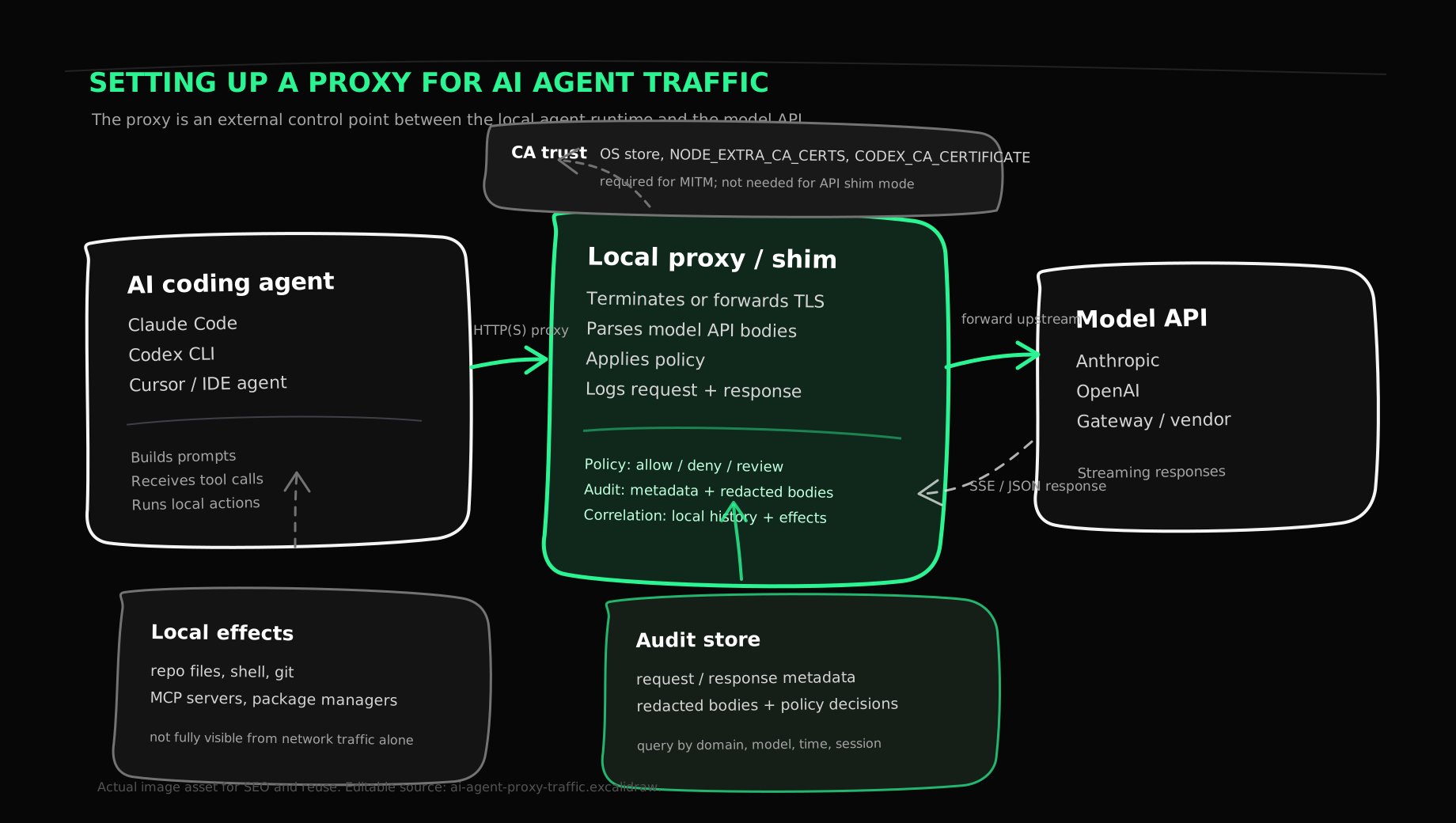
A proxy is not the whole governance story. It will not know why a developer approved a command, whether a file write was correct, or whether an npm install script did something unsafe. It does give you the network evidence you need before an audit story can be taken seriously.
The Basic Shape
For HTTPS model APIs, a proxy setup has three moving parts:
- The agent process must route traffic through the proxy. For CLIs, this often means
HTTP_PROXYandHTTPS_PROXY. For IDE apps, it may require system proxy settings, a PAC file, or an app-specific base URL. - The agent process must trust the proxy's certificate authority if the proxy is doing TLS interception. Node-based tools often use
NODE_EXTRA_CA_CERTS; Codex documentsCODEX_CA_CERTIFICATEandSSL_CERT_FILE; GUI apps may require the OS trust store. - The proxy must log, redact, evaluate policy, and forward the request upstream without breaking streaming responses.
The TLS piece is the part that trips people up. A normal HTTP proxy can see a CONNECT api.anthropic.com:443 tunnel, but it cannot see the HTTPS payload inside that tunnel. A MITM proxy terminates that TLS connection locally, creates a new TLS connection upstream, and presents the client with a leaf certificate for api.anthropic.com signed by a local CA. If the client does not trust that CA, the request fails with a certificate error.
Certificate management is not a side detail. The local CA private key is powerful. If someone else gets it, they can impersonate sites trusted by machines that installed that CA. Generate a dedicated CA for the proxy, protect the private key, install it only on managed machines, and rotate it when the trust boundary changes.
Start With Explicit Wrapping
The cleanest first setup is not a system-wide proxy. Start by wrapping one command so only that agent process inherits the proxy environment.
Using Rye's local proxy as the concrete example:
rye up --install-ca --intercept-patterns anthropic.com,claude.com,openai.com,chatgpt.com
Then verify the proxy and certificate path:
rye status
rye ca path
rye doctor
For a Node-based agent such as Claude Code, the important environment variables are the proxy address and the CA bundle:
export RYE_PROXY="http://127.0.0.1:18080"
export RYE_CA="$(rye ca path)"

HTTP_PROXY="$RYE_PROXY" \
HTTPS_PROXY="$RYE_PROXY" \
NODE_EXTRA_CA_CERTS="$RYE_CA" \
claude
Rye's wrapper does the same thing for a child process:
rye wrap claude
The wrapper pattern avoids two easy mistakes. It does not proxy your whole workstation while you are testing, and it makes sure the agent sees the proxy variables at launch. Many CLI and IDE runtimes read proxy and trust settings once, during startup.
Codex Has Different Trust Knobs
Do not assume every assistant is Node-based. NODE_EXTRA_CA_CERTS is the right knob for Node processes, but Codex documents CODEX_CA_CERTIFICATE and SSL_CERT_FILE for custom trust bundles.
For Codex, prefer the documented CA variables:
export RYE_PROXY="http://127.0.0.1:18080"
export RYE_CA="$(rye ca path)"

HTTP_PROXY="$RYE_PROXY" \
HTTPS_PROXY="$RYE_PROXY" \
CODEX_CA_CERTIFICATE="$RYE_CA" \
codex
If your Codex version or HTTP stack ignores those proxy variables, use the product's base URL or provider settings instead. The variable name matters less than verifying both halves:
- Does the agent connect to the proxy?
- Does the agent trust the certificate chain presented by the proxy?
When debugging, capture the failure mode precisely. "No traffic in the proxy" is different from "traffic reaches the proxy but TLS verification fails" and different again from "the request forwards upstream but the provider rejects the API call."
Use An API Shim When You Can
MITM is useful because it works with software that only knows how to talk to https://api.vendor.com. But when an agent supports a configurable base URL, a reverse proxy or API shim is often cleaner.
For example, Rye can start a lightweight HTTP shim for Anthropic-compatible traffic:
rye up \
  --shim-listen 127.0.0.1:18090 \
  --shim-upstream https://api.anthropic.com
Then point a compatible client at the shim:
ANTHROPIC_BASE_URL="http://127.0.0.1:18090" claude
In this mode, the client talks plain HTTP to localhost, and the shim makes the real TLS request upstream. There is no local CA to install. The tradeoff is compatibility: this only works when the assistant exposes a base URL setting and the shim understands the API shape, headers, streaming format, and error semantics.
Use MITM when you need broad compatibility. Use an API shim when the client gives you a stable base URL knob.
What The Proxy Can See
A model API request usually contains more than the current prompt. Depending on the assistant and provider, the proxy may see:
- The model name and API path, such as
/v1/messages,/v1/responses, or a vendor-specific gateway endpoint. - System, developer, project, and user instructions.
- Conversation history and summarization artifacts.
- Tool definitions, including schemas for shell, file, search, edit, MCP, browser, and task tools.
- File snippets, repository maps, diffs, and command output included as context.
- Tool-call requests emitted by the model.
- Tool results sent back to the model after local execution.
- Token usage, request IDs, latency, status codes, and streaming event chunks.
That visibility is useful, but it has a hard edge. The proxy sees traffic that crosses the network. It does not automatically see a local file write, a Git commit, a permission prompt, or a shell command that never leaves the machine. Those have to come from local telemetry: session transcripts, file watchers, process supervision, Git diffs, shell output, and assistant-specific history stores such as ~/.claude/projects/ and ~/.codex/sessions/.
This is usually the first gap teams hit. A proxy answers "what went to the model?" It does not, by itself, answer "what changed on the workstation?"
Inspect The Captures
Once traffic is flowing, start with metadata before opening raw payloads:
rye history --domain anthropic.com --last 10m
rye history --domain openai.com --last 10m
Then export a small time window for structured inspection:
rye history export --format json --domain anthropic.com --last 10m
Look for the boring fields first: timestamp, method, URI, status code, content type, response time, user agent, and request size. Those fields tell you whether the capture path is working and whether you are looking at the right process.
Only then inspect the JSON body. For AI agent traffic, the body is often the audit record:
{
  "model": "claude-sonnet-...",
  "messages": [
    {
      "role": "user",
      "content": "Refactor the auth middleware..."
    }
  ],
  "tools": [
    {
      "name": "Bash",
      "input_schema": {
        "properties": {
          "command": { "type": "string" }
        }
      }
    }
  ]
}
For streaming APIs, the response may arrive as server-sent events. A useful proxy must forward chunks immediately while also buffering enough data to log the final response. If the proxy waits for the whole stream before forwarding it, the assistant UI feels broken. If it forwards without teeing, you lose the response body.
Add Policy At The Network Boundary
Once the proxy can parse requests, it can do more than record them. It can evaluate policy before forwarding.
Useful first policies are simple:
- Deny payloads containing obvious private-key markers such as
BEGIN OPENSSH PRIVATE KEY. - Deny model requests above a maximum byte size.
- Allow only known LLM domains.
- Require review for unknown model names or unknown gateways.
- Flag requests where
.env,id_rsa, production hostnames, or customer identifiers appear in the body.
Rye's policy engine treats the request as structured data: method, URI, host, path, user agent, content type, model, body length, and parsed body. A rule can match on domain, model, body content, or maximum body size. The proxy can then allow, deny, or require approval before the request leaves the machine.
That is different from a prompt instruction like "do not send secrets." Prompt policy depends on the model cooperating. Proxy policy sits outside the model request path and can block the request.
Common Failure Modes
Most setup failures are mundane. Check these before assuming the assistant is doing something unusual.
NODE_EXTRA_CA_CERTS. Use the documented trust knob for that runtime.HTTP_PROXY or HTTPS_PROXY values.NO_PROXY excludes the target host, localhost proxy address, or an internal gateway you expected to capture.Avoid solving trust errors by setting NODE_TLS_REJECT_UNAUTHORIZED=0 except in a disposable test shell. Disabling certificate verification teaches you almost nothing about the production setup, and it weakens exactly the boundary you are trying to inspect.
What To Redact
Raw model traffic is sensitive. A proxy for AI coding agents should redact at least:
Authorization,Cookie,Set-Cookie,X-API-Key, and vendor-specific credential headers.- OAuth tokens, session IDs, refresh tokens, and signed URLs.
- Private keys,
.envvalues, database URLs, cloud credentials, and SSH material. - Customer data copied into prompts, tool output, stack traces, or fixture files.
Redaction changes where captured data can live. "Raw prompts with credentials" and "structured metadata with redacted bodies" are different legal and operational problems. That difference affects centralization, retention, and access controls.
The safest rollout pattern is to begin with metadata-only retention, then enable body capture for narrowly scoped domains, teams, or incident windows. Keep retention short until you have a review process.
The Missing Half: Correlation
The proxy gives you model traffic. The local agent gives you session history. The filesystem and shell give you effects.
A useful audit trail joins all three:
model request
  -> policy decision
  -> model response with tool call
  -> local tool execution
  -> file/process/network effects
  -> tool result sent back to model
  -> final assistant response
Without correlation, you end up with three partial truths:
- The provider log says a request happened.
- The assistant transcript says a tool call happened.
- Git says files changed.
That is not enough for incident response. You need to know which model response caused which tool call, which approval or policy rule allowed it, which local process executed it, which files changed, and which follow-up request sent the result back.
A proxy is the network lens. Process wrapping, file telemetry, session ingestion, and centrally versioned policy turn that lens into an audit system.
A Practical Rollout Plan
Start narrow:
- Wrap one CLI agent on one test workstation.
- Capture only model API domains.
- Verify TLS trust with a non-sensitive request.
- Inspect metadata before retaining bodies.
- Add redaction for credentials and common secret formats.
- Correlate proxy captures with local assistant transcripts.
- Move from local allowlists to centrally managed policy bundles.
- Add retention limits before expanding to more developers.
The finish line is not "we have a proxy." The finish line is "we can prove what an AI coding agent saw, what it asked to do, what policy allowed it, and what changed afterward."
That layer cannot depend on one assistant. Teams will use Claude Code, Codex, Cursor, internal wrappers, MCP servers, and whatever comes next. The steady place to put control is outside the assistant: a local runtime supervisor that routes traffic, enforces policy, ingests history, and normalizes audit data across tools.
That is the shape Rye is built around.